Create 3D models that move your design forward

Win work, inspire stakeholders, and find project alignment with help from SketchUp. 

Using SketchUp for visualisation

icon

Explore your creativity

Ideate and iterate with visuals to get a clear picture of your design choices — and unveil surprising possibilities.

design with ai driven solutions

Jump start productivity

Get designing fast with AI-driven, time-saving solutions that help you zoom from the first sketch to the final design.

craft compelling design stories

Craft compelling design stories

Clear visualizations move your project from design to done by maintaining the alignment needed to keep work flowing.

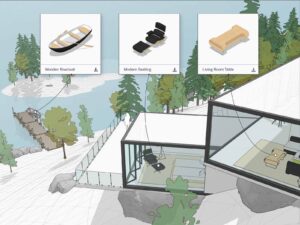
3D Warehouse pre-made models

Professional, robust and accurate

Visualise your project quickly and clearly in 3D with SketchUp for Desktop, our most popular 3D modeller.

Joe Clemons,
Production Manager, Monteith Construction Corp.

“We used my SketchUp model in a presentation with a client, and it was the best thing ever. They loved being able to see exactly what they were getting. We had total buy-in from the time they accepted our proposal to the construction of the building.”

Enhanced realism

Add a new level of depth to your 3D models with the click of a button when you use Ambient Occlusion.

Add a new level of depth to your 3D models with the click of a button when you use Ambient Occlusion.
Joe C.
Architect

 “Ambient Occlusion is the single most exciting feature in recent years! Most of my models are achromatic, so this really makes them pop, particularly architectural interiors.”

Breathtaking visuals in seconds

Explore design concepts through AI-generated imagery with Diffusion for quick iteration and ideation.

Breathtaking visuals in seconds with Sketchup
Daniel Tal,
Digital Studio Manager, Confluence

“SketchUp combined with Diffusion is a full cycle design tool, not just rendering. For example, using this for exterior rendering is amazing. I knew this would be possible, but I expected it in 10 years.”

Architectural visualization of a modern building created in SketchUp vs Revit comparison, showing outdoor seating and realistic V-Ray rendering

Integrated rendering engine

Use the combined power of V-Ray and SketchUp to create photorealistic renderings that bring your design vision into reality.

Matthew Valero,
Registered Architect, Director of Visualisation at DBVW

“I was inside SketchUp and it was just a couple of little settings, I clicked that render button for V-Ray, and I was totally blown away by the realism. Being able to render at this quality in SketchUp was another moment for me where I thought there’s no turning back to other tools.”

SketchUp badges

Compare SketchUp Plans

Compare plan table

Create visualisations that bring designs into reality

View our blog