


SketchUp AI: Smarter Design, Faster Workflows With Built-In AI Tools

Design work often sits between creative exploration and practical delivery. Ideas need room to develop, but projects still move on fixed timelines. The tools used along the way have to support both sides of that process without disrupting momentum.
SketchUp AI has been introduced with this balance in mind. Instead of positioning artificial intelligence as a replacement for design thinking, SketchUp embeds AI directly into the software to assist with everyday tasks. The aim is to help designers visualise ideas earlier and reduce interruptions during modelling.
This article explores how AI in SketchUp works in practice, focusing on how the tools support everyday workflows while maintaining creative control.
What SketchUp AI Means for Designers
AI in SketchUp is not a separate product or add-on. It lives inside the software and works alongside familiar tools and workflows. That distinction is significant.
Instead of generating designs from scratch or automating creative decisions, the AI tools focus on streamlining the modelling process. They support visual thinking during early design stages and reduce the time spent on repetitive modelling tasks. At the same time, they make it easier to access guidance and answers without leaving the workspace.
This approach reflects how designers actually work. SketchUp automation is applied to save time, while the creative direction remains firmly in human hands.
Built-In AI Tools That Support Real Work
The current AI features inside SketchUp centre around two core tools: AI Render and the AI Assistant. Each addresses a different part of the design process, from early concept work through to detailed development.
Before diving into each tool, it is worth noting that these features are available across multiple SketchUp subscription plans and product options, including Go, Pro, Pro Scan, Pro Advanced Workflows, Studio and EDU. Users can explore the tools using included credits, making it easy to test them within real projects. More details on SketchUp’s AI features are available for those who want a closer look at how they work.
AI Render: Faster Visuals Without Leaving SketchUp
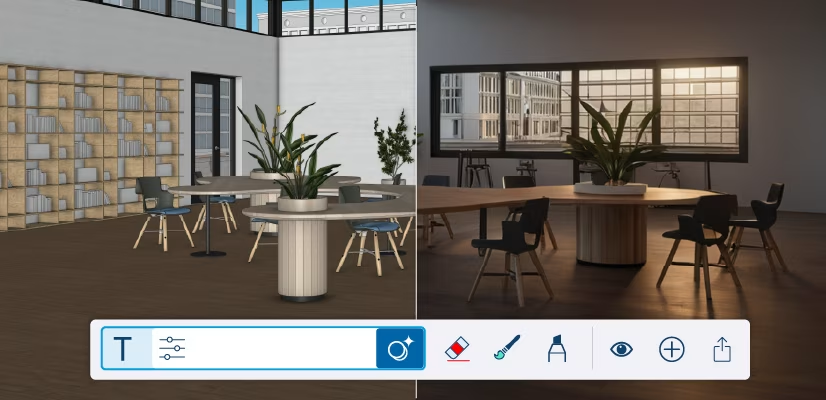
AI Render is designed to enhance visual communication during active design work, helping ideas move forward without breaking the modelling workflow.
Visualising Ideas Earlier in the Process
Visualisation often sits between concept and approval. Designers need to communicate intent clearly, even while a model is still taking shape. AI Render enables visuals to be generated directly from the model, bringing AI rendering into the design process without disrupting designers’ workflows.
Concept Renders That Support Design Direction
During early design stages, speed often matters more than polish. Concept renders can convey how materials are intended to feel and how light interacts with a space, giving stakeholders a clear sense of direction without requiring a fully detailed model.
Refining Visuals as the Model Develops
As a project progresses, the same tool can be used to produce more refined visuals for internal reviews or presentations. Because the underlying geometry remains unchanged, designers can trust that what they are showing accurately reflects the model itself.
In practice, AI Render acts as a visual companion that supports communication while leaving refinement and decision-making firmly in the designer’s hands.
AI Assistant: Practical Support While You Work
The assistant is designed to support active modelling by offering guidance and assistance without interrupting the design process.
How the AI Assistant Supports Modelling
The AI Assistant supports modelling through practical capabilities built directly into the workspace.
- Generates objects directly in context: Designers can describe what they need and create 3D elements that fit naturally into the existing model. This is particularly useful during early layout work when spaces are still being defined.
- Access in-context help without disruption: Questions can be asked directly in SketchUp, eliminating the need to search external documentation. This keeps attention on the model and reduces interruptions.
- Maintain full designer control: The assistant does not make decisions on the user’s behalf. Suggestions are optional and generated objects remain fully editable.
In practice, this creates a quiet support layer that adapts to how designers already work.
Who These AI Tools Are Designed For
These AI tools are relevant across a wide range of professions. Architects benefit from faster visual feedback during concept development. Interior designers can explore finishes and layouts more efficiently. Landscape designers can use early visuals to convey how a space is intended to feel from the outset.
Builders and contractors also gain value, particularly when models are used for coordination or client communication. Clear visuals paired with faster modelling help improve understanding on site.
Educators and students using SketchUp EDU can introduce AI tools in a controlled way. This reinforces design thinking and shows how technology can support the process without replacing it.
Across all these use cases, the emphasis remains the same. AI tools for architects and designers should reduce effort without diminishing authorship.
AI in SketchUp and Designer Control
A common concern around generative design tools is loss of control. SketchUp takes a different approach by ensuring AI features operate within boundaries defined by the user.
AI Render responds directly to the model you create. The AI Assistant works from your prompts and context. Neither tool makes independent design decisions or alters work without input.
This balance reassures professionals who rely on precision and intent. AI acts as a collaborator that responds to direction, rather than an automated system producing unpredictable results.
For teams working to tight deadlines, this often determines if new tools are adopted or set aside.
Getting Started With AI Tools in SketchUp

Exploring SketchUp AI does not require a change in how you already work. The tools are built directly into SketchUp and can be tested using AI credits included with paid subscriptions, allowing designers to try them within real project workflows before using them more regularly.
AI Render can be explored during early concept phases, while the AI Assistant supports modelling tasks and in-context guidance as needed. Over time, these small efficiencies help workflows feel smoother without introducing additional complexity.
As SketchUp continues to develop its AI features, the emphasis remains on practical support and improving design flow, with automation applied only when needed.
SketchUp Africa: Explore SketchUp AI With Confidence
SketchUp AI is designed to fit naturally into professional workflows, offering practical support at important stages of the design process.
If you are curious about how these tools could improve your daily design process, take a look at the built-in AI features, test them on real projects and see how they complement your existing approach.
Connect with the SketchUp Africa team to learn how built-in AI tools support creativity.